DerPilot81
Grünschnabel
Hallo,
aus einen CMS System (Magnolia) wurde eine Homepage generiert mit CSS und HTML Code.
Für die Navigation (horizontal) sind drei Ebenen vorgesehen, die dann "aufgeblättert" werden wenn der vorherige Menüpunkt aktiv ist.
Das CMS System hat das mit "position" realisiert (teils mit absolute und relative). Jedoch wird die zweite und dritte Ebene im IE eingerückt dargestellt. Die Navigationsleiste beginnt dann immer unterhalb des aktiv gewählten Menüpunktes. Im FF dagegen stimmt die anzeige.
An was kann das denn liegen? Ich denke es ist vermutlich nicht die optimale Lösung das mit "position" zu machen. Aber das System hat es so generiert und wenn möglich würde ich es gerne so belassen. An dem HTML Code kann man nichts ändern, lediglich die CSS kann angepasst werden.
Herzlichen Dank schon mal. Ich habe mich bereits drei Tage damit befasst und schon einiges probiert aber die Einrückung konnte ich bislang nicht umgehen. Scheinbar mal wieder ein IE Problem. Ähnliche Probleme habe ich auch noch nicht gefunden.
Bilder:
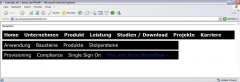
Es soll so wie auf dem ersten Bild aussehen (links bündig). Im FF ist die Anzeige in Ordnung.
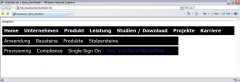
So wie auf dem zweiten Bild sieht es im IE aus. Seltsam eingerückt.
Anzeige im Firefox:

Anzeige im Internet Explorer:

Es folgt ein Auszug auf der CSS und aus der HTML Datei:
CSS (nur der Teil für die Navigation):
HTML (nur der Teil der Navigation):
Ich hoffe es hat jemand einen Rat. Falls noch mehr Code notwendig sein sollte kann ich den gerne nochschicken.
Ich bedanke mich dafür, dass ihr das anschaut und vielleicht hat ja wirklich jemand eine Idee warum das so sein könnte.
LG
Ingo
aus einen CMS System (Magnolia) wurde eine Homepage generiert mit CSS und HTML Code.
Für die Navigation (horizontal) sind drei Ebenen vorgesehen, die dann "aufgeblättert" werden wenn der vorherige Menüpunkt aktiv ist.
Das CMS System hat das mit "position" realisiert (teils mit absolute und relative). Jedoch wird die zweite und dritte Ebene im IE eingerückt dargestellt. Die Navigationsleiste beginnt dann immer unterhalb des aktiv gewählten Menüpunktes. Im FF dagegen stimmt die anzeige.
An was kann das denn liegen? Ich denke es ist vermutlich nicht die optimale Lösung das mit "position" zu machen. Aber das System hat es so generiert und wenn möglich würde ich es gerne so belassen. An dem HTML Code kann man nichts ändern, lediglich die CSS kann angepasst werden.
Herzlichen Dank schon mal. Ich habe mich bereits drei Tage damit befasst und schon einiges probiert aber die Einrückung konnte ich bislang nicht umgehen. Scheinbar mal wieder ein IE Problem. Ähnliche Probleme habe ich auch noch nicht gefunden.
Bilder:
Es soll so wie auf dem ersten Bild aussehen (links bündig). Im FF ist die Anzeige in Ordnung.
So wie auf dem zweiten Bild sieht es im IE aus. Seltsam eingerückt.
Anzeige im Firefox:
Anzeige im Internet Explorer:
Es folgt ein Auszug auf der CSS und aus der HTML Datei:
CSS (nur der Teil für die Navigation):
Code:
/* GLOBAL HORIZONATAL NAVIGATION
-------------------------------- */

/* 1st level horizontal subnav */

#nav-global {
        border-top: 1px solid #4a4a4a;
}

#nav-global.plus-navsub {
        min-height: 6.8em;
        height: 6.8em; /* IE 6 */
}

#wrapper > #nav-global.plus-navsub {
        height: auto;
}

#nav-global ul {          --> Das ist für die erste Ebene
        position: relative;
        background: black url(../img/bgs/nav-global-line.png) 0 93% repeat-x;
        float: left;
        width: 100%;
        margin: 0 0 24px 0;
        list-style: none;
}

#nav-global.plus-navsub ul {
        border-bottom: none;
}

#nav-global li {
        float: left;
        margin: 2px 10px 0 0;
        padding-bottom: 5px;
        font-size: 150%;
        font-weight: bold;
}

#nav-global li a,
#nav-global li a:visited,
#nav-global li strong {
        display: block;
        float: left;
        color: #fff;
        text-decoration: none;
}

#nav-global li a {
        cursor: pointer; /* IE */
}

/* on + open */
#nav-global li.on,
#nav-global li.open {
        background: url(../img/bgs/nav-global.png) 50% 90% no-repeat;
}

#nav-global li strong,
#nav-global li.open a {
        xxxbackground: #c0d0ec;
}

#nav-global li strong span,
#nav-global li.open a span {
        padding-right: 10px;
}

#nav-global li span,
#nav-global li.open a span {
        float: left;
        margin-left: 5px;
        padding: 6px 10px 5px 5px;
}


/* 2nd level horizontal subnav */

#nav-global ul ul {    --> Das ist für die zweite Ebene
        position: absolute;
        left: 0;
        top: 2.3em;
        width: 940px;
}

#nav-global li li,
#nav-global li li.on {
        background: none;
        font-size: 100%;
}

#nav-global li.open li span,
#nav-global li.open li a,
#nav-global li.open li strong{
        background: none;
        font-weight: normal;
}

#nav-global li.open a {
        text-decoration: none;
}

#nav-global li.open li.on a span {
        font-weight: bold;
        color: #081c73;
}

#nav-global li li a:hover,
#nav-global li li a:active,
#nav-global li li a:focus,
#nav-global li li a:hover span,
#nav-global li li a:active span,
#nav-global li li a:focus span {
        background: none;
        color: #081c73;
}


/* 3nd level horizontal subnav */

#nav-global ul ul ul {       --> Das ist für die dritte Ebene
        position: absolute;
        left: 0;
        top: 2.2em;
        width: 940px;
}

#nav-global li li li,
#nav-global li li li.on {
        background: none;
        font-size: 100%;
}

#nav-global li li.open li span,
#nav-global li li.open li a,
#nav-global li li.open li strong{
        background: none;
        font-weight: normal;
}

#nav-global li li.open a {
        text-decoration: none;
}

#nav-global li li.open li.on a span {
        font-weight: bold;
        color: #081c73;
}

#nav-global li li li a:hover,
#nav-global li li li a:active,
#nav-global li li li a:focus,
#nav-global li li li a:hover span,
#nav-global li li li a:active span,
#nav-global li li li a:focus span {
        background: none;
        color: #081c73;
}
HTML (nur der Teil der Navigation):
Code:
    <div id="nav-global" class="plus-navsub">
        <h6>Navigation</h6>
      <ul>


              <li id="nav-sec-home">
                      <a href="/Author/Home.html"><span>Home</span></a>
              </li>


              <li id="nav-sec-unternehmen">
                      <a href="/Author/Home/Unternehmen.html"><span>Unternehmen</span></a>
              </li>


              <li id="nav-sec-Produkt" class="open">
                      <a href="/Author/Home/Produkt.html"><span>Produkt</span></a>
      <ul>


              <li>
                      <a href="/Author/Home/Produkt/Wozu_IdM-.html"><span>Anwendung</span></a>
              </li>


              <li class="open">
                      <a href="/Author/Home/Produkt/Bausteine.html"><span>Bausteine</span></a>
      <ul>


              <li>
                      <a href="/Author/Home/Produkt/Bausteine/Provisioning.html"><span>Provisioning</span></a>
              </li>


              <li>
                      <a href="/Author/Home/Produkt/Bausteine/Compliance.html"><span>Compliance</span></a>
              </li>


              <li>
                      <a href="/Author/Home/Produkt/Bausteine/Single_Sign_On.html"><span>Single Sign On</span></a>
              </li>


              <li class="on">
                      <a href="/Author/Home/Produkt/Bausteine/Workflow_Content.html"><strong><span><em>You are here:</em>Workflow -..</span></strong></a>
              </li>
      </ul>
              </li>


              <li>
                      <a href="/Author/Home/Produkt/Produkte.html"><span>Produkte</span></a>
              </li>


              <li>
                      <a href="/Author/Home/Produkt/Stolpersteine.html"><span>Stolpersteine</span></a>
              </li>
      </ul>
              </li>


              <li id="nav-sec-leistung">
                      <a href="/Author/Home/Leistung.html"><span>Leistung</span></a>
              </li>


              <li id="nav-sec-studien_download">
                      <a href="/Author/Home/Studien_Download.html"><span>Studien / Download</span></a>
              </li>


              <li id="nav-sec-projekte_referenzen">
                      <a href="/Author/Home/Projekte_Referenzen.html"><span>Projekte</span></a>
              </li>


              <li id="nav-sec-karriere">
                      <a href="/Author/Home/Karriere.html"><span>Karriere</span></a>
              </li>
      </ul>
    </div><!-- end nav-global -->
Ich hoffe es hat jemand einen Rat. Falls noch mehr Code notwendig sein sollte kann ich den gerne nochschicken.
Ich bedanke mich dafür, dass ihr das anschaut und vielleicht hat ja wirklich jemand eine Idee warum das so sein könnte.
LG
Ingo
Zuletzt bearbeitet: