ERLEDIGT
JA
JA
ANTWORTEN
6
6
ZUGRIFFE
748
748
EMPFEHLEN
-
Hallo alle zusammen,
Um Objekte zu sparen würde ich gern via Coffee das Constraint/Ausrichten-Tag umgehen und beispielsweise die x-Achse einer Matrix auf ein Ziel ausrichten. Wichtig wäre noch die Möglichkeit einen Up-Vektor hinzufügen. Hat jemand einen Tip oder einen Link parat? Wäre Euch sehr dankbar.
Mit besten Grüßen
Rown
-
Ob Coffee Tag oder Ausrichten Tag, is doch wurscht ? Beim ersten musst du halt selber schreiben.
++ nux95.com cg artist portfolio ++ Offset Randomizer 2.0 a c4d-coffee plugin by niklas rosenstein ++
-
Hola nux,
bei AusrichtenTags braucht man immer ein Objekt, das das Tag trägt, sich entsprechend ausrichtet und dessen Werte man dann weiterverarbeiten kann. Schnell werden das dann aber Milliarden von Objekten. Beim CoffeeTag denke ich mir kann man das umgehen. Allerdings tue ich mich noch unglaublich schwer damit Matrizen zu verstehen. V0 als Position und V1-V3 für die Achsen verstehe ich noch, aber was die Einzelteile in einem AchsenVektor anbelangen, habe ich keine Ahnung. Ein Wert davon gibt wohl die Länge des Vekors an (also das was im Koordinatenmanager hinter G.x,G.y,G.z zu finden ist). Was aber bedeuten die anderen beiden Werte? Naja, entsprechend bin ich nun auf der Suche.
Bis denne
Rown
-
Willst du die Position auf die Ausgerichtet werden soll von Hand eingeben oder wie ?

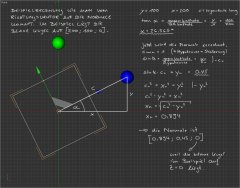
Guckst du hier:
matrix.png
Die Kugeln stellen jeweils v1, v2 und v3 dar, deren werte aber mit 120 Multipliziert, sonst sieht man den Unterschied ja nicht.
Ich denke das sollte klar stellen was die Vektoren von 1 - 3 bedeuten
++ nux95.com cg artist portfolio ++ Offset Randomizer 2.0 a c4d-coffee plugin by niklas rosenstein ++
-
naja gefühlte Milliarden
...
hier die Früchte meiner Beschäfftigung mit dem Thema:
http://style.tutorials.de/v10/images/attach/jpg.gif
Nähere Informationen zu der Funktionsweise dieser Xpresso-Schaltung findet man in Arndt von Koenigsmarcks Buch "Cinema 4d 9 - Grundlagen und Workshops für Profis" ab Seite 130.
Das Ganze in Coffee gebracht sieht dann so aus:
Code :1 2 3 4 5 6 7 8 9 10 11 12 13 14 15 16 17 18 19 20 21 22
main(doc,op) { var op_mg = op->GetMg(); var op_pos = op_mg->GetV0(); var z_obj_pos = doc->FindObject("Kugel_Z")->GetMg()->GetV0(); var y_obj_pos = doc->FindObject("Kugel_Y")->GetMg()->GetV0(); var z_vector = z_obj_pos - op_pos; var y_vector = op_pos - y_obj_pos; var z_vector_normale = vnorm(z_vector); var x_vector_normale = vnorm(vcross(z_vector, y_vector)); var y_vector_normale = vnorm(vcross(z_vector, vcross(z_vector, y_vector))); op_mg->SetV0(op_pos); op_mg->SetV1(x_vector_normale); op_mg->SetV2(y_vector_normale); op_mg->SetV3(z_vector_normale); op->SetMg(op_mg); }
und verkürzt:
Code :1 2 3 4 5 6 7 8 9 10 11 12 13
main(doc,op) { var op_mg = op->GetMg(); var z_obj = doc->FindObject("Kugel_Z"); var y_obj = doc->FindObject("Kugel_Y"); op_mg->SetV0(op_mg->GetV0()); op_mg->SetV1(vnorm(vcross(z_obj->GetMg()->GetV0() - op_mg->GetV0(), op_mg->GetV0() - y_obj->GetMg()->GetV0()))); op_mg->SetV2(vnorm(vcross(z_obj->GetMg()->GetV0() - op_mg->GetV0(), vcross(z_obj->GetMg()->GetV0() - op_mg->GetV0(), op_mg->GetV0() - y_obj->GetMg()->GetV0())))); op_mg->SetV3(vnorm(z_obj->GetMg()->GetV0() - op_mg->GetV0())); op->SetMg(op_mg); }
...naja, nicht sehr viel kürzer, aber funktioniert auch.
Grüße an nux und alle, die das hier mal suchen werden
Rown
-
Just in diesem Moment habe ich die Richtungsvektoren gerafft.
Grüße
Rown
-
Ich hatte hier vor längerer Zeit XPresso- und Coffe-Möglichkeiten zum Thema reingestellt und würde jetzt mal eine Pythonvariante dranhängen. Bei dieser Funktion ist es möglich auch die Achsen für Aim- und UpVector einzustellen.
GrüßeCode :1 2 3 4 5 6 7 8 9 10 11 12 13 14 15 16 17 18 19 20 21 22 23 24 25 26 27 28 29 30 31 32 33 34 35 36 37 38 39 40 41 42 43 44 45 46 47 48 49 50 51 52 53 54 55 56 57 58 59 60 61 62 63 64 65 66 67 68 69 70
import c4d import re #Welcome to the world of Python def AimAxis(pos_obj, aim_obj, aim_axis, up_obj, up_axis): if isinstance(pos_obj, c4d.Vector): obj_pos = pos_obj if isinstance(pos_obj, c4d.Matrix): obj_pos = pos_obj.off if isinstance(pos_obj, c4d.BaseObject): obj_pos = pos_obj.GetMg().off if isinstance(aim_obj, c4d.Vector): aim_obj_pos = aim_obj if isinstance(aim_obj, c4d.Matrix): aim_obj_pos = aim_obj.off if isinstance(aim_obj, c4d.BaseObject): aim_obj_pos = aim_obj.GetMg().off if isinstance(up_obj, c4d.Vector): up_obj_pos = up_obj if isinstance(up_obj, c4d.Matrix): up_obj_pos = up_obj.off if isinstance(up_obj, c4d.BaseObject): up_obj_pos = up_obj.GetMg().off axis = (aim_axis, up_axis) axis_objs = (aim_obj_pos, up_obj_pos) new_Mg = c4d.Matrix() new_Mg.off = obj_pos for i in axis: if re.search(r"\A[-+]{,1}[xyz]\Z", i) == None: print "String '{0}' wird nicht verstanden".format(i) return None if re.search(r"\A-[xyz]\Z", i) != None: if i == axis[0]: aim_vec = -(aim_obj_pos - obj_pos) if i == axis[1]: up_vec = -(obj_pos - up_obj_pos) else: if i == axis[0]: aim_vec = aim_obj_pos - obj_pos if i == axis[1]: up_vec = obj_pos - up_obj_pos aim_vec_norm = aim_vec.GetNormalized() third_vec_norm = aim_vec.Cross(up_vec).GetNormalized() up_vec_norm = aim_vec.Cross(third_vec_norm).GetNormalized() for i in axis: if i == axis[0]: if re.search(r"\A[-+]{,1}[x]\Z",i) != None: new_Mg.v1 = aim_vec_norm if re.search(r"\A[-+]{,1}[y]\Z",i) != None: new_Mg.v2 = aim_vec_norm if re.search(r"\A[-+]{,1}[z]\Z",i) != None: new_Mg.v3 = aim_vec_norm if i == axis[1]: if re.search(r"\A[-+]{,1}[x]\Z",i) != None: new_Mg.v1 = up_vec_norm if re.search(r"\A[-+]{,1}[y]\Z",i) != None: new_Mg.v2 = up_vec_norm if re.search(r"\A[-+]{,1}[z]\Z",i) != None: new_Mg.v3 = up_vec_norm new_str = "" for i in range(len(str(axis))): if re.search(r"[xyz]", str(axis)[i]) != None: new_str = new_str + str(axis)[i] if new_str[0] == new_str[1]: print "Benutze zwei unterschiedliche Achsen!" return None if new_str in ["zy","xz","yx"]: if re.search(r"\A[^x]{1,2}\Z", new_str) != None: new_Mg.v1 = third_vec_norm if re.search(r"\A[^y]{1,2}\Z", new_str) != None: new_Mg.v2 = third_vec_norm if re.search(r"\A[^z]{1,2}\Z", new_str) != None: new_Mg.v3 = third_vec_norm else: if re.search(r"\A[^x]{1,2}\Z", new_str) != None: new_Mg.v1 = -third_vec_norm if re.search(r"\A[^y]{1,2}\Z", new_str) != None: new_Mg.v2 = -third_vec_norm if re.search(r"\A[^z]{1,2}\Z", new_str) != None: new_Mg.v3 = -third_vec_norm return new_Mg def main(): obj = op.GetObject() aim_obj = doc.SearchObject("AIM") up_obj = doc.SearchObject("UpV") obj.SetMg(AimAxis(obj, aim_obj, "x", up_obj, "-z"))

Rown
Ähnliche Themen
-
Spline ausrichten mit COFFEE^
Von Orbit im Forum Cinema 4DAntworten: 2Letzter Beitrag: 22.06.08, 16:05 -
2 iFrames als Ziel?
Von Gomilli im Forum Javascript & AjaxAntworten: 2Letzter Beitrag: 23.03.06, 16:29 -
Excel: logarithmische X-Achse und und Skalierung der X-Achse ändern
Von HPB im Forum Office-AnwendungenAntworten: 0Letzter Beitrag: 04.08.05, 13:48 -
Morph, Zwei Verformungen für das Morphing erstellt: Ziel.1 und Ziel.2
Von delphinhawe im Forum Cinema 4DAntworten: 4Letzter Beitrag: 14.06.05, 22:17 -
Zelle als Ziel
Von Quick_Mik im Forum HTML & XHTMLAntworten: 3Letzter Beitrag: 08.12.03, 17:39


Zitieren
Login


Cinema 4D Tutorial - Ketten erstellen mit Cinema 4D (R11.5)